

Right now, everyone’s adding “GenAI” to their product. Dashboards, chatbots, search bars, you name it. AI gets sprinkled on top. The demos are slick. Stakeholders love them. Roadmaps suddenly look ambitious.
And then, quietly, things stall. NTT Data report shows that 70-85% of the GenAI projects fail to deliver the desired ROI. In scaled production, as MIT Nanda report finds, the number goes up to 95%.
GenAI problems initially don’t raise any alarms. They just slowly make the system fade. It’s tempting to blame the model. But that’s usually wrong. The real issues show up much earlier, when the questions were being asked (or not asked) for the model to work on a direction.
GenAI isn’t a feature you just add, it reshapes how a product behaves, how users think, how decisions get made. If you treat it like a minor upgrade, you will end up with something that looks impressive in a demo and falls apart in real use. This is a common pattern we have discovered. Teams jump straight into prompts, tools, model choices without understanding the problem.
In this blog, I won’t discuss prompt tricks or model comparisons but help you do the groundwork, the stuff that decides whether your GenAI effort actually works.
Why Most GenAI Products Fail Quietly
GenAI failures are subtle as they don’t show any crashes or outages. These features slowly take the backseat when no one uses them.
You have probably seen these:
- A demo that wows everyone, and then never sees real traffic
- Outputs that are close, but not close enough to trust
- Costs creep up while value stays flat
- Compliance or data issues surfacing way too late
Once any one of these pop, users stop relying on it. Teams stop talking about it and let it just exist. This happens when we fail to acknowledge the model as a product decision, one that changes behavior, expectations, and risk. If you skip the design thinking, you will invest a lot of your resources and still end up solving the wrong problem.
So, the question becomes: what should you be asking instead?
Question 1: Is GenAI the Right Tool for This Problem?
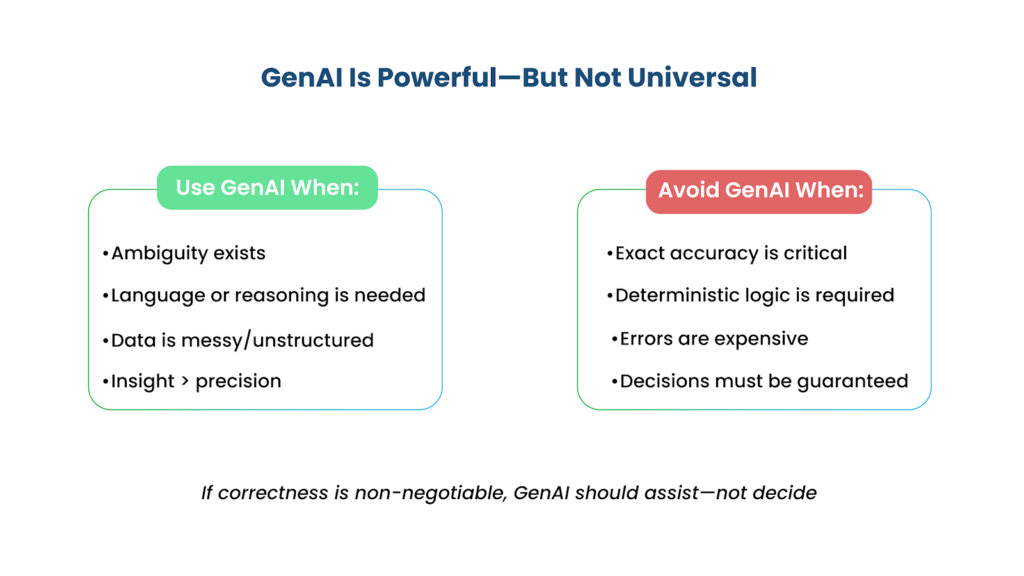
GenAI is powerful, but it’s not a default choice. It may work well for you to work through ambiguity, understand or generate language, pull together scattered information, or reason across messy, loosely structured data. But it really struggles when you need deterministic logic, exact numbers, or guarantees.
Let me give you an example of how to ask GenAI the right questions. Don’t ask, “Can we use GenAI here?” That’s too easy a question to answer yes to. Instead, ask: “What becomes possible only because of GenAI?” If you don’t have a clear answer for it, you probably don’t need it.
There are questions we often fail to ask ourselves: what breaks if the model is wrong? How expensive is a mistake? If correctness isn’t negotiable, the model shouldn’t be making decisions. Let it assist, advise – not decide.
Question 2: What Exactly Is the Model Responsible For?
A lot of companies are promoting GenAI as a perfect “AI assistant” designed for “Smart insights.” As promises, they sound nice. But also, they are dangerously vague.
If you can’t describe what the model does in a single, precise flow, you are already setting yourself up for unpredictable behavior. Think in terms of Input → Transformation → Output and be concrete about each step.
- What goes in – raw text, structured data, user queries?
- What happens inside – summarization, classification, multi-step reasoning?
- What comes out – a paragraph, a confidence score, a routed action?
- Is the model writing something? Sorting or tagging data? Explaining a system decision? Pulling and combining knowledge from multiple sources?
If the answer is “a bit of everything,” that is a red flag. Vague responsibilities produce messy outcomes. Every time. More than half of the GenAI projects fail due to scope creep and unclear priorities. Product owners must understand that a single model cannot “solve everything at once”. Vague model outputs make employees double-check all the “confidently wrong” or irrelevant answers. This is known as the Verification Tax. When this happens, adoption rate drops because the tool is not fit for a specific, reliable workflow.
Question 3: What Knowledge Does the Model Actually Need?
Here’s a misconception that teams commonly have: “The model already knows this.” It doesn’t. It doesn’t know your internal pricing logic, your edge cases, or not the way your ops team interprets a flagged transaction. If these factors matter, you have to provide detailed directions to the model.
So, where does that knowledge come from? Prompts are quick to set up but shallow. Internal documents fed through RAG pipelines give you more grounding and scale better over time. Fine-tuning gets you specialization but creates a maintenance burden most teams underestimate. Live APIs and databases handle the stuff that can’t be static.
Speaking of static, most teams don’t think hard enough about knowledge freshness. What can live in a prompt? What needs to update daily? What has to be real-time? Getting these wrong doesn’t produce dramatic failures. The product slow drifts, where outputs are subtly off and nobody can quite explain why.
A lot of so-called “model problems” are data problems. Full stop.
Question 4: What Happens When the Model Is Wrong?
The model will be wrong, not occasionally, not in weird edge cases, but regularly. When you are developing one, plan for it. There can be cases like the New York City chatbot advised that restaurants can serve people food half-eaten by rodents if the customer is informed. For such situations, trust depends on how gracefully the model can handle failure and recover from it.
You cannot design an error-free system. There will be errors. What you have to consider is what the system does once the error occurs. Your model will be affected if your users can spot those errors. What you have to ask is—
- Can they verify the output against something?
- Can they fix it without jumping through hoops?
- Are sources surfaced so users can spot-check?
- Is there a human review step for high-stakes outputs?
- Can users edit or override without it feeling like they’re fighting the system?
The best GenAI products don’t pretend to be infallible. They make recovery fast and low-friction. From our experience, we know that teams that perform “AI autopsies” (structured analysis of the root-cause of errors) fix their models twice as fast as those that do not.
Question 5: How Does This Change the User Experience?
This is where things get genuinely interesting, and where a lot of teams phone it in.
Traditional UI is structured. Predictable. The user clicks a button. Something specific happens. GenAI introduces flexibility but also ambiguity, and that ambiguity must go somewhere. Usually, it lands on the user.
So now you’ve got new design questions. Who initiates? Does the system proactively surface something, or does the user pull? How much real control does the user have over outputs? Can they refine, reject, or freely edit? Or does the interface quietly nudge them toward accepting whatever the model produced?
“Magical” is an overused word in this space, and honestly, a bit of a warning sign. The best GenAI experiences don’t feel magical. They feel like working with a capable colleague who’s transparent about their reasoning. If it feels like a black box, users won’t trust it. If it feels like a genuine collaborator, they will.
Question 6: What Are the Real Costs Beyond Tokens?
Token costs are the visible tip. Most of the cost is underwater.
Yes, API usage and infrastructure matter. But the costs that actually sink projects are the ones that don’t show up on the first invoice. Latency that quietly degrades UX, monitoring and observability pipelines that get complex fast, evaluation infrastructure—which, if you’re doing it seriously, becomes a significant engineering investment on its own, legal and compliance overhead that surfaces six months in and the slow erosion of user trust when outputs are inconsistent in ways that are hard to diagnose are some of the major issues that surface later.
Before shipping, ask: who actually benefits, and how often will this be used in practice? Is the value worth the operational drag? Because GenAI isn’t just expensive in dollars. It’s expensive in attention, coordination, and sustained engineering effort.
A Gut-Check Before You Ship
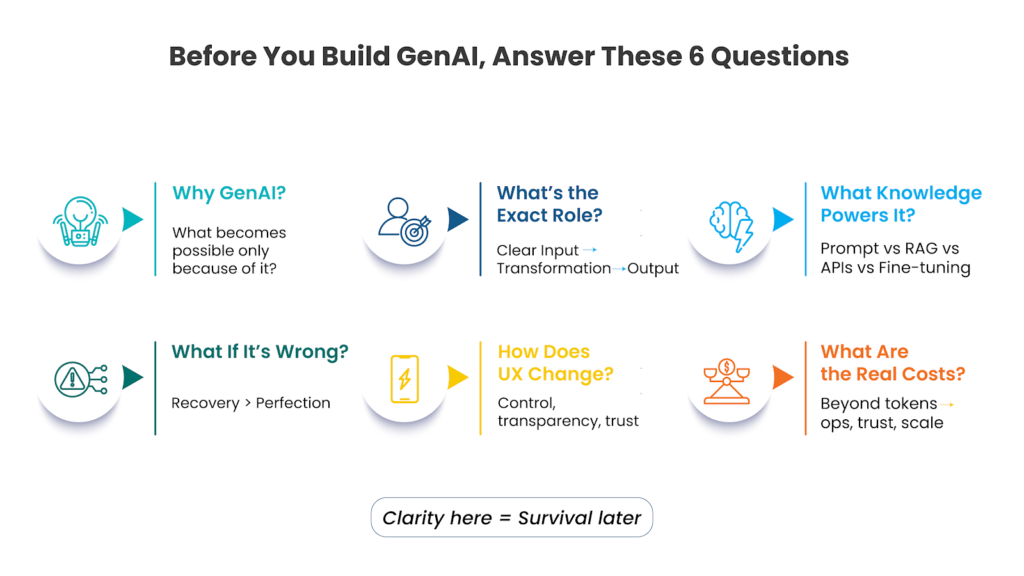
If you’ve gotten this far and it feels like a lot, here’s a simpler way to keep yourself honest. Six questions:
- Why GenAI specifically—what does this enable that nothing else would?
- What exactly does the model do, described as a precise input-to-output flow?
- Where does its knowledge come from, and how fresh does it need to be?
- What’s the recovery path when it’s wrong?
- How does the user stay meaningfully in control?
- What are the real costs?
If you can answer all six clearly, you’re probably building something real. If you’re still fuzzy on two or three of them, you’re still in exploration mode. That’s fine, just don’t ship from there.
GenAI as a Product Discipline
Building with GenAI isn’t purely an engineering problem. It sits at an uncomfortable intersection of product thinking, UX, data architecture, systems design, and like it or not- ethics. Most teams are staffed for one or two of those. All five matters.
The teams doing this well aren’t the ones chasing the latest model release or rewriting their stack every quarter. They’re the ones asking sharper questions earlier and being honest when the answers aren’t good yet.
In a space full of hype and fast-moving tooling, that rigor is the actual edge.