

For years, CAPTCHA has been the polite way of saying, ” Automation not welcome.”
And if you have spent any time as a SDET, you have run into it. Tests stall in staging. Teams disabling CAPTCHA in test environments to keep pipelines moving. Flaky OCR hacks that work, until they don’t. Slow third-party solver services. And pipelines waiting on human verification logic that was never designed to be automated in the first place.
None of these have ever solved the problem. It just moved it round.
What’s changed now is not CAPTCHA itself. It’s the capability available to handle it.
Using the Groq API with a Llama 4 Scout 17B 16E, image-based CAPTCHA can be solved in milliseconds as part of the test execution flow itself. Not as a workaround. As a built-in step.
That changes the nature of the problem. CAPTCHA is no longer something you bypass or disable. It becomes something your test system is designed to handle, just like any other dependency. And once you look at it that way, the implications go beyond this one-use case. Because it isn’t really about CAPTCHA. It is about what happens when AI becomes a native part of your test infrastructure.
In the rest of this article, i will walk you through how this approach works in practice – what the execution flow looks like, where AI fits in a typical test stack, and how to implement it using Playwright as a working example. Then we will step back and look at what this changes – for reliability, for CI/CD, and for how SDETs need to think about automation going forward.
Before we get into how this works in practice, it is worth understanding why this is even possible now.
What makes this possible now
This didn’t happen because CAPTCHA got easier. It happened because systems can now interpret interfaces, not just interact with them.
Meta’s Llama 4 Scout is a natively multimodal model. It understands text and images in the same reasoning flow. A CAPTCHA is no longer “an image to decode” – it’s just another input the system can interpret.
On the infrastructure side, the Groq API runs these models with extremely low latency and supports tasks like visual understanding, OCR, and contextual interpretation in a single call.
In effect, your test system can now see and interpret UI elements the way a human would. This marks a broader shift from scripts that interact with interfaces to systems that can understand them.
What the execution flow looks like
Once you see the flow, the whole thing becomes a lot less mysterious.
At a high level, nothing complicated is happening:-
- The test loads the page
- The script extracts CAPTCHA image URL (or Base64)
- Sends it to Groq API
- Llama-4-Scout model extracts text
- Test fills the CAPTCHA input
- Login proceeds
That’s it.
No Plugins. No OCR engines. No external solver platforms.
The only requirement is the ability to make an HTTP request.
That’s what makes this approach different. It’s AI integrated directly into the infrastructure layer of your test architecture.
Where AI fits in your test stack
Before getting into code, it’s worth calling out something most people miss when they first see this approach.
This isn’t tied to any specific automation framework. Whether you are using Playwright, WebDriver IO, Selenium, Cypress, Appium, or even running REST-based test suites,, the pattern stays the same.
In this article, I will use Playwright (Node.js) as the working example, but the idea carries across.
Now that you see how this fits into your test infrastructure, let’s put theory into practice.
Let’s build it using Playwright (working example)
The following is the code example for passing your Captcha image to the model via a URL:
Prerequisites
At a minimum, you need:
- Node.js 18+
- Playwright installed
- A Groq API key
- Basic async JavaScript knowledge
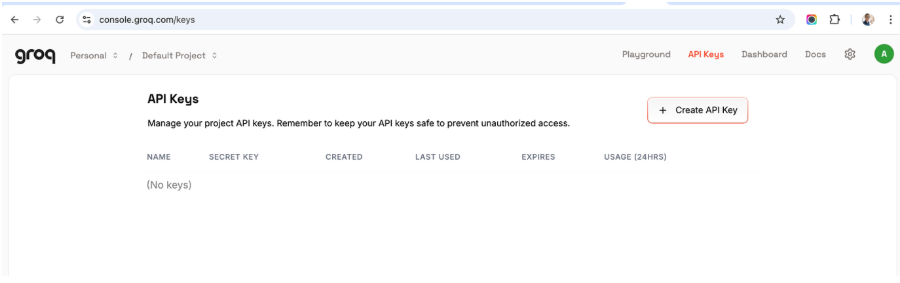
Step 1 – Get your API key
Go to https://console.groq.com/login, create an account and get an API Key:
Step 2- Install dependencies

Step 3- Create a .env file

How it works
The AI solver function
This function takes the CAPTCHA image, sends it to the model, and returns the text so the test can move forward.
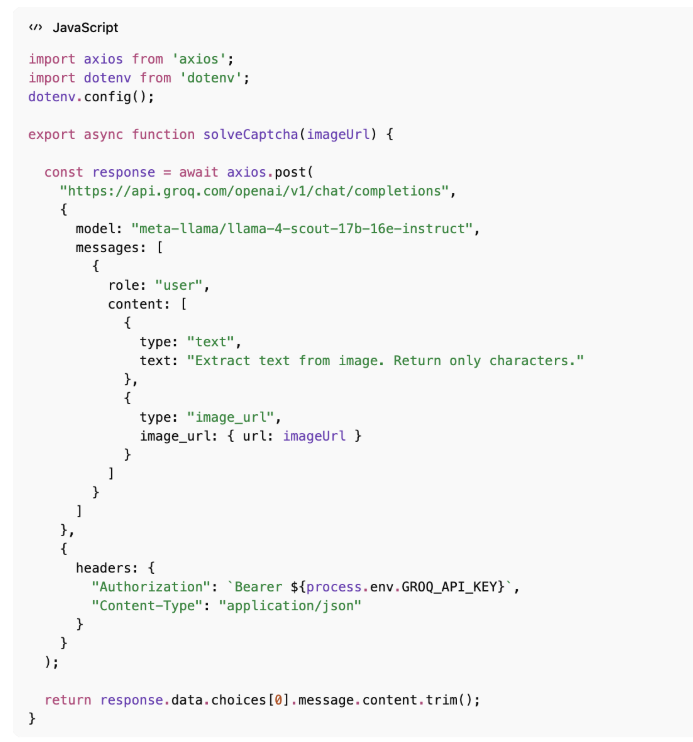
Just one API call, you get the characters back, and there is barely any cleanup needed.
Full Playwright test
Now lets see how this fits into a complete Playwright test.
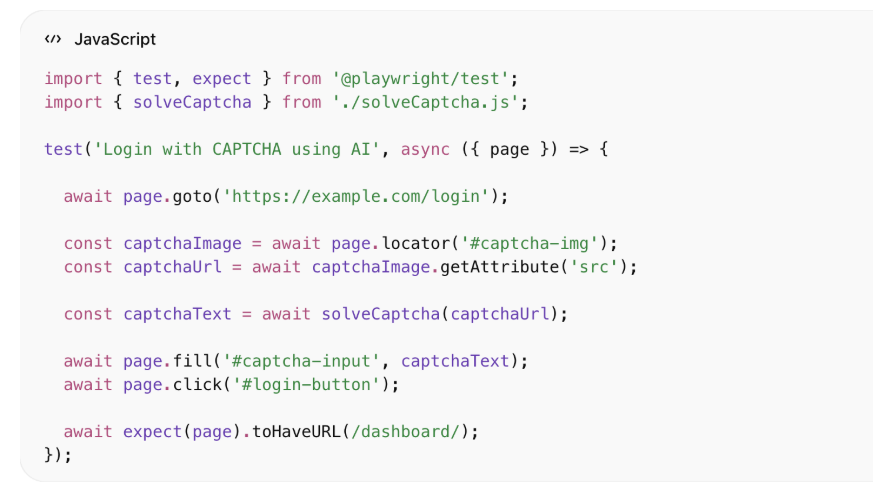
Running the test on a sample CAPTCHA
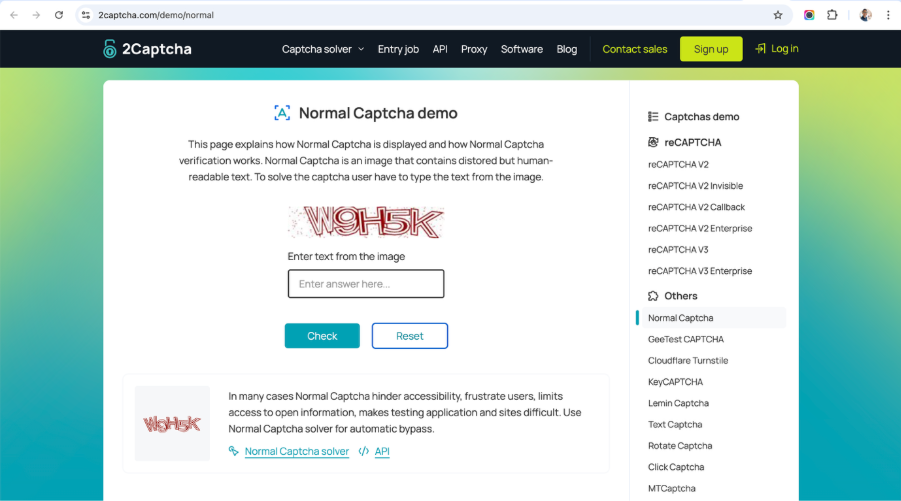
Let’s take the demo CAPTCHA below and use our test along with the AI solver function to extract the text from it.
- Step 1- Visit https://2captcha.com/demo/normal that has a demo captcha form.
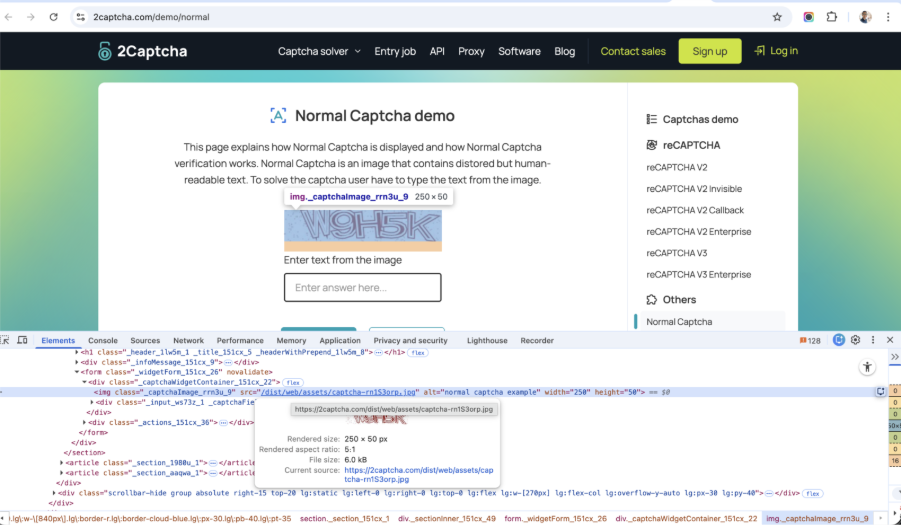
Step 2- Get the image url from the ‘src’ attribute of the captcha image element
Step 3- Pass this ‘url’ in the ‘captchaUrl’ variable in the above playwright test.
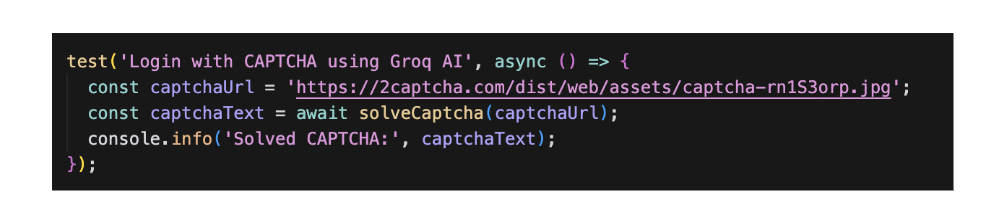
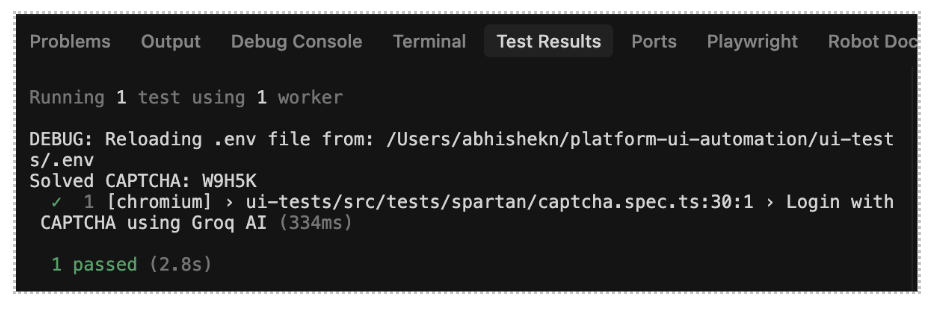
On running the above test, output shows Captcha text being returned (W9H5K):
Why this changes test engineering ?
Sub-second inference
Groq’s architecture is built for speed. That means:
- No CI/CD slowdowns
- No multi-second waits per CAPTCHA
- No flaky retry loops
Model precision
The Llama-4-Scout model handles:
- Distorted text
- Case sensitivity
- Background noise
- Warped characters
This reduces the classic OCR failure rate.
Native integration
Works anywhere an HTTP call works:
- Playwright
- Selenium
- Cypress
- REST-based automation
- Mobile automation
This is not a browser hack. It’s infrastructure-level AI integration.
What SDETs must think about (Beyond the demo) ?
If you are going to use this in a real pipeline, you still need to treat it like any other dependency. This is where senior-level thinking starts.
CI/CD hardening
Do not blindly plug this in.
Add:
- API key as encrypted pipeline secret
- Retry with threshold validation
- Timeouts
- Structured latency logging
- Rate-limit handling
Example retry wrapper:
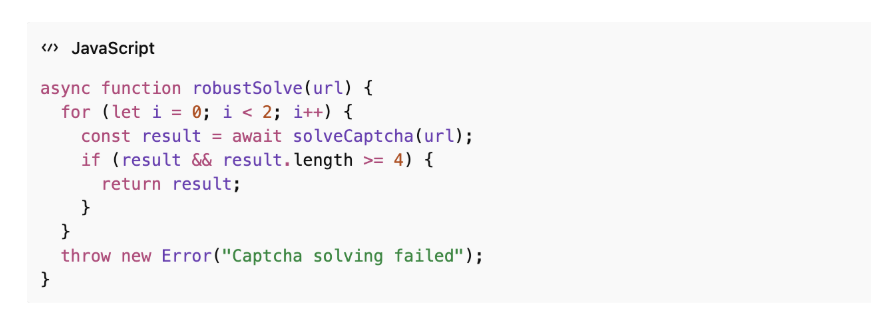
AI is powerful — but reliability engineering still matters.
Observability & metrics
Track:
- Solve latency
- Failure rate
- Model drift
- Accuracy vs expected
This becomes a quality signal in your test suite health dashboard.
Cost modeling
Each CAPTCHA = API call.
You must evaluate:
- Cost per 1,000 solves
- Monthly pipeline volume
- Budget impact vs 3rd-party solvers
For most mid-scale test suites, this is still significantly cheaper and faster than traditional CAPTCHA services.
Pros & cons of this approach
The upside is clear
- You eliminate one of the most persistent blockers in UI automation.
- Tests run in environments that stay closer to production.
- Flakiness drops because you are not relying on brittle OCR or external hacks.
- It is also faster than traditional OCR approaches, which removes delays and retry loops from your pipelines.
- The integration itself is simple. And overall, the system becomes simpler because you are removing layers of workaround logic.
But there are trade-offs too
- You are introducing an external API dependency.
- There is a direct cost tied to usage.
- Rate limits and latency variability need to be handled.
- There are legal and ethical misuse risks that need to be clearly understood and respected.
- And as CAPTCHA system evolve, this approach will need to evolve with them.
Ethical and security boundary
Let’s be clear. It is worth being explicit about where this approach makes sense and where it does not.
Using this in your own QA environment is a practical and responsible use case. The same goes for controlled security research where you have permission to test system behaviour.
But applying this to system you don’t or don’t have authorization to test crosses a different line. That moves from engineering into misuse, and in many cases, into legal risk. AI makes things easier. It reduces friction in places that used to slow us down.
What it doesn’t do is remove responsibility for how those capabilities are used.
Is CAPTCHA dead?
For simple text-based CAPTCHA, it’s effectively no longer a meaningful barrier.
That doesn’t mean security stops evolving. It just moves. You will see more behavioural signals, more interaction-based detection, and more AI on the defensive side as well.
So, it is not the end of CAPTCHA, it is end of this version of it.
What this means for the modern SDET
The role has already been evolving, but this makes the direction clearer.
A few years ago, the focus was on automating UI interaction. Then it expanded in CI/CD ownership and pipeline reliability. Now it’s moving towards integrating intelligent systems directly into test infrastructure.
That changes what skills matter.
- You need to understand how to integrate LLM API’s.
- Have a working grasp of prompt engineering so you can guide these system effectively.
- At the same time, reliability engineering becomes critical, because these models are part of your execution layer and need to behave predictably under load.
- Apart from this you should know how to monitor and measure their behaviour, and how to think about cost and ethics as part of engineering decisions.
Automation is no longer just about interacting with the DOM. It’s about building systems that can interpret and respond to what they are interacting with.
Conclusion
CAPTCHA used to block automation. Now it is something your system can handle with a single call. That changes the question. It is no longer “can we automate this? It is whether your test architecture is evolving quickly as the capabilities around it.
Because if you are still relying on OCR libraries and workarounds, you are not really solving the problem- you are maintaining an old approach to it.
And at that point, it is not tooling issue. It is a signal that your stack needs to evolve.