


When you are building Python applications that use AWS DynamoDB, handling data between your code and your database can become messy. If you use DynamoDB’s raw API directly, your business code ends up dealing with database-specific data formats. On the other hand, many existing ORM libraries are large, add extra dependencies, use complex internal tricks, and don’t always work smoothly with standard Python typing.
As the application grows, it is often best to keep dependencies lightweight and leverage the features Python already offers to ensure long-term maintainability. Fortunately, modern Python includes powerful tools for building clean abstractions without the need for heavy frameworks.
In this guide, I will show you how to build a simple yet production-ready ORM layer for DynamoDB, using typing. Annotated, standard dataclases, and class decorators. The goal is to make your data model the single source of truth, ensure strong typing, and keep the code maintainable, all without relying on bulky third-party libraries and complex metaclasses.
You can find the full, working code in the companion repository.
The problem with Raw boto3
When using Amazon DynamoDB with Python, the raw boto3 client can quickly become repetitive. Every time you save or read data, you have to work with DynamoDB’s low-level format, where each value requires a type tag—such as {"S": "value"} for strings or {"N": "42"} for numbers. This isn’t a major issue for a small script, but as the project grows and you work with more tables and data models, the extra code starts to pile up. Instead of focusing on business logic, you spend your time repeatedly writing the same type wrappers.
DynamoDB uses these type wrappers because that is the format it expects when data is sent over the network. As a result, even simple operations can appear much more complex than they actually are.
Below is a typical DynamoDB write operation using the raw client:
client.put_item(
 TableName="Orders",
 Item={
 "orderId": {"S": order.order_id},
 "userId": {"S": order.user_id},
 "status": {"S": order.status.name},
 "createdAt": {"N": str(order.created_at)},
 }
)
And reading that same item back requires reversing the entire mapping manually:
response = client.get_item(TableName="Orders", Key={"orderId": {"S": order_id}})
item = response["Item"]
order = Order(
 order_id=item["orderId"]["S"],
 user_id=item["userId"]["S"],
 status=OrderStatus[item["status"]["S"]],
 created_at=int(item["createdAt"]["N"]),
)
Why this doesn’t scale well
- Duplication: Each field is referred at least three times: once during field definition, again during serialization, and once more during deserialization.
- Fragility: DynamoDB attribute names (such as “orderId”) are string literals scattered throughout the source code. Simply renaming a database column necessitates a risky global search-and-replace operation.
- Maintenance overhead: Adding a single field requires modifying code in multiple disconnected places, drastically increasing the likelihood of runtime bugs.
Design goals
The data model should serve as the single source of truth for your schema. A developer creating a new model should only need to define three elements:
- The target table name and its primary key schema.
- The data fields and their corresponding attribute names in DynamoDB.
- Any custom conversions for non-primitive types (enums, timestamps, nested objects).
Everything else like serialization, deserialization, and database routing should be handled generically by the infrastructure layer.
Architecture overview
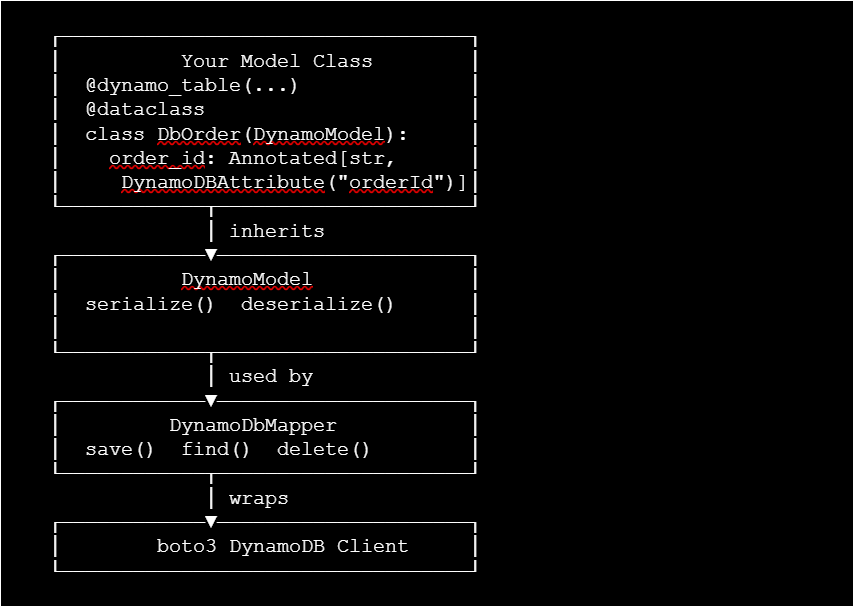
Components
Your Model Class– Single source of truth
You define fields with Annotated type hints that embed the DynamoDB attribute name and any converter directly alongside the Python type. This is the only place schema information lives no separate mapping files, no duplicated string literals elsewhere in your codebase.
DynamoModel – Serialization core
A base class your model inherits from. It reads those annotations at runtime using Python’s reflection API, and uses them to drive two operations: serialize() converts a Python object into the low-level DynamoDB wire format ({"S": "value"}), and deserialize() does the exact reverse. It knows nothing about table names or network calls.
DynamoDbMapper — Data access layer
The only layer that talks to boto3. It reads the table name and key schema from the model’s config (attached by @dynamo_table), then calls serialize() before writing and deserialize() after reading. You subclass it once per model (e.g. OrderDao) and get typed save(), find(), and delete() for free.
boto3 DynamoDB Client — Network layer
Handles raw network calls. The rest of the stack never touches it directly.
The payoff: Adding a new field means one line in your model. Renaming a DynamoDB attribute means changing one string. No other layer needs to change.
Data Flow
Write path
Python object → serialize() → DynamoDB wire format → boto3 put_itemYou hand a Python object to your DAO. The ORM looks at how each field is declared, converts complex types (enums, datetimes) into primitives, and translates the whole object into the raw format DynamoDB expects — all automatically. Your code never sees the wire format.
Read path
boto3 get_item → DynamoDB attribute map → deserialize() → Python objectDynamoDB returns a raw attribute map. The ORM matches each attribute back to its field, runs the reverse conversion (string → enum, epoch number → datetime), and hands you back a fully typed Python object. Unknown attributes added by other services are silently ignored, so schema evolution doesn’t break old code.
Step-by-Step Implementation
Step 1: Schema mapping with Dynamo DB Attribute
Python 3.9+ introduced typing.Annotated, which allows you to attach arbitrary metadata to type hints. Static analysis tools (like mypy) only see the primary type, but our application code can inspect the metadata at runtime. We can use this to embed our database schema directly within the field declarations:
from dataclasses import dataclass
from typing import Optional, Type

@dataclass(frozen=True)
class DynamoDBAttribute:
    alias: str                        # DynamoDB attribute name on the wire
    converter: Optional[Type] = None  # Optional hook for custom types
With this metadata class, a model field is declared cleanly like this:
user_id: Annotated[str, DynamoDBAttribute("userId")] = "" Design Note: Any fields declared without a DynamoDBAttribute annotation are automatically excluded from serialization. This makes it incredibly straightforward to maintain internal computed states, transient properties, or non-persisted properties on your models.
Full implementation: See attributes.py
Step 2: Extensible type converters
Data layers often require specialized storage formats for compound types that DynamoDB doesn’t natively support. For instance, natively storing Python Enums or datetime objects directly will fail with standard serializers. By separating conversion into standalone processing classes, we can isolate encoding and decoding behavior without touching the core orchestration logic.
Here’s the interface all converters must implement:
class SomeConverter:
    @staticmethod
    def convert(py_value) -> Any:
        """Convert from Python type to serializable primitive."""
        ...

    @staticmethod
    def unconvert(wire_value, field_type) -> Any:
        """Convert from wire format back to Python type."""
Here’s an example with EnumConverter:
class EnumConverter:
    @staticmethod
    def convert(v: Any) -> Optional[str]:
        return v.name if v is not None else None

    @staticmethod
    def unconvert(wire_value: Any, enum_type: Any) -> Any:
        return enum_type[wire_value] if wire_value is not None else None
To use it, pass the converter in the field’s DynamoDBAttribute annotation:
class OrderStatus(Enum):
    PENDING = "PENDING"
    SHIPPED = "SHIPPED"
    DELIVERED = "DELIVERED"

# Stored as "PENDING" in DynamoDB; loaded back as OrderStatus.PENDING
status: Annotated[OrderStatus, DynamoDBAttribute("status", converter=EnumConverter)] = OrderStatus.PENDING
The ORM calls convert() on write and unconvert() on read automatically — your application code always works with the native OrderStatus type.
Full implementations: See converters.py for all converters including EpochMsConverter and JsonConverter.
Step 3: Table configuration via @dynamo_table
Instead of cluttering models with inner Meta classes or external configuration dictionaries, we use a clean class decorator to attach table metadata. This avoids the magic and inheritance gotchas often associated with custom metaclasses.
from typing import Mapping, Callable, Any, TypeVar
C = TypeVar("C", bound=type)

def dynamo_table(
    *,
    table_name: str,
    hash_key: str,
    range_key: Optional[str] = None,
    global_secondary_index_configs: Optional[Mapping[str, GlobalSecondaryIndexConfig]] = None,
) -> Callable[[C], C]:
    def decorator(cls: C) -> C:
        cfg = DynamoTableConfig(
            table_name=table_name,
            hash_key=hash_key,
            range_key=range_key,
            global_secondary_index_configs=global_secondary_index_configs or {},
        )
        setattr(cls, "__dynamo_table_config__", cfg)
        return cls
    return decorator
The decorator simply attaches configuration as a class attribute—no magic required.
Full implementation: See decorators.py and attributes.py
Step 4: Extracting annotated metadata at runtime
To convert our dataclass fields into database records, we need to inspect the type hints and extract our DynamoDBAttribute metadata. Python provides the get_origin and get_args utilities in the typing module for exactly this purpose.
from typing import get_origin, get_args, Annotated
def _parse_field_metadata(model_field: dataclasses.Field):
    """Return (db_alias, converter_class, core_type) or None."""
How to read the return value:
- Format:
(db_alias, converter_class, core_type) db_alias:Name used in DynamoDB item payloads (wire name)- converter_class: Converter used for encode/decode (None means no custom conversion)
core_type:Final Python type after unwrapping Annotated / Optional
Practical examples:
- Input field:
order_id: Annotated[str, DynamoDBAttribute("orderId")]
Return:("orderId", None, str)
Interpretation: store under orderId, no converter needed, treat value asstr. - Input field:
status: Annotated[OrderStatus, DynamoDBAttribute("status", converter=EnumConverter)]
Return:("status", EnumConverter, OrderStatus)
Interpretation: use EnumConverter to serialize/deserializeOrderStatus. - Input field: created_at:
Annotated[Optional[datetime], DynamoDBAttribute("createdAt", converter=EpochMsConverter)]
Return:("createdAt", EpochMsConverter, datetime)
Interpretation: store undercreatedAt, convert with epoch-ms converter, deserialize asdatetime.
⚠️ Gotcha — Avoid Direct `.__metadata__` Access: Some older tutorials access field.type.__metadata__ directly. This is a private CPython implementation detail and is not guaranteed to remain stable across Python runtimes. Stick to the public API: get_args(field.type)[1:].
⚠️ Gotcha — The `from __future__ import annotations` Pitfall: If you use lazy annotation evaluation (standard in modern Python codebases), field.type evaluates to a raw string literal instead of a class object at runtime. This causes get_origin to return None, silently breaking serialization. To make your ORM completely robust against this, resolve type hints at the class level using typing.get_type_hints(cls, include_extras=True) instead of reading field.type directly.
Full implementation: See serialization.py
Step 5: Optimizing performance with caching
Inspecting class schemas at runtime via dataclasses.fields() is incredibly flexible, but executing reflection logic on every single database read or write introduces unnecessary CPU overhead. Because a class schema is immutable during runtime execution, we can eliminate this penalty using functools.lru_cache:
import functools
from typing import Dict, Tuple

@functools.lru_cache(maxsize=None)
def _cached_serialization_map(target_class: type) -> Dict[str, Tuple]:
    """Returns Dict[field_name -> (db_alias, converter_class, core_type)]."""
The deserialization map follows the same pattern but with an inverse mapping (DB alias → Python field name).
Full implementation: See serialization.py
Step 6: Core serialization logic
With our cached structural metadata ready, we can implement the baseline DynamoModel class. We leverage boto3’s native TypeSerializer and TypeDeserializer utilities to convert standard Python primitives into low-level DynamoDB wire formats.
from boto3.dynamodb.types import TypeSerializer, TypeDeserializer

class DynamoModel:
    @classmethod
    def get_schema(cls) -> DynamoTableConfig:
        """Retrieves the table layout configuration attached by the decorator."""
        ...

    def serialize(self) -> Dict[str, Any]:
        """Marshal this instance into a DynamoDB wire record."""
        ...

    @classmethod
    def deserialize(cls, item_record: Dict[str, Any]) -> T:
        """Reconstruct a model instance from a DynamoDB wire record."""
Example — serialize() input/output:
# Input: a model instance
order = DbOrder(
    order_id="o-1001",
    user_id="u-2002",
    status=OrderStatus.CONFIRMED,
)

# Output: DynamoDB wire format dict
order.serialize()
 {
     "orderId":  {"S": "o-1001"},
     "userId":   {"S": "u-2002"},
     "status":   {"S": "CONFIRMED"},
 }
None and empty string fields are automatically omitted from the output (sparse format).
deserialize() does the exact reverse—takes a raw DynamoDB wire dict and reconstructs a typed model instance.
Full implementation: See model.py
Step 7: The DynamoDbMapper
The final piece of the architecture is the query mapper, which abstracts typical boilerplate interactions away from your business layer entirely. It acts as a generic engine that can orchestrate CRUD workflows for any class extending our DynamoModel.
class DynamoDbMapper:
    def __init__(self, dynamodb_client, model_class: Type[DynamoModel]):
        schema_config = model_class.get_schema()
        self._client = dynamodb_client
        self._model_class = model_class
        self._table_name = schema_config.table_name
        self._hash_key = schema_config.hash_key
        self._range_key = schema_config.range_key

    def save(self, item: DynamoModel) -> None:
        """Persist a model instance using put_item."""
        ...

    def find(self, hash_key_value, range_key_value=None) -> Optional[DynamoModel]:
        """Retrieve an item by primary key and deserialize it."""
        ...

    def delete(self, hash_key_value, range_key_value=None) -> None:
        """Remove an item from the table by primary key."""
Creating a specialized Data Access Object (DAO) for a model requires zero boilerplate:
class OrderDao(DynamoDbMapper):
    def __init__(self, client):
        super().__init__(client, DbOrder)
Full implementation: See mapper.py
Putting it all together
With all pieces of the infrastructure in place, let’s see how clean and straightforward the business domain logic looks. Here’s a model using several field types:
from enum import Enum
from typing import Annotated, Optional
from dataclasses import dataclass
from datetime import datetime

class OrderStatus(Enum):
    PENDING = "pending"
    CONFIRMED = "confirmed"
    SHIPPED = "shipped"

@dynamo_table(
    table_name="ProductionOrders",
    hash_key="orderId",
    global_secondary_index_configs={
        "by-user-index": GlobalSecondaryIndexConfig(
            index_name="by-user-index",
            hash_key="userId",
            range_key="createdAt",
        )
    },
)
@dataclass
class DbOrder(DynamoModel):
    # String fields (primitive)
    order_id: Annotated[str, DynamoDBAttribute("orderId")] = ""
    user_id: Annotated[str, DynamoDBAttribute("userId")] = ""

    # Enum field (requires converter)
    status: Annotated[OrderStatus, DynamoDBAttribute("status", converter=EnumConverter)] = OrderStatus.PENDING

    # Datetime field (stored as epoch milliseconds)
    created_at: Annotated[Optional[datetime], DynamoDBAttribute("createdAt", converter=EpochMsConverter)] = None

    # Dict field (stored as JSON string)
    metadata: Annotated[Optional[dict], DynamoDBAttribute("metadata", converter=JsonConverter)] = None

    # Optional string (sparse)
    note: Annotated[Optional[str], DynamoDBAttribute("note")] = None
See order_example.py for the complete example.
Now you can use it with type safety:
import boto3

order_dao = OrderDao(boto3.client("dynamodb"))

# Direct Write
order_dao.save(DbOrder(
    order_id="o-1001",
    user_id="u-2002",
    status=OrderStatus.CONFIRMED,
    created_at=datetime.now(timezone.utc),
    metadata={"channel": "mobile_app", "discount_code": "WELCOME20"},
    note="Deliver to back door"
))

# Type-Safe Read
retrieved_order = order_dao.find("o-1001")
print(retrieved_order.status)      # Output: OrderStatus.CONFIRMED
print(retrieved_order.created_at)  # Output: 2026-06-01 22:32:23+00:00
The Verdict: Why use this approach?
| Architectural Concern | Solution Placement |
| DynamoDB Attribute Mapping | Co-located inside standard type definitions via Annotated |
| Table Configuration / Keys | Declared cleanly directly above the class with @dynamo_table |
| Complex Field Parsing | Isolated inside lightweight, decoupled static Converters |
| Database Operations | Standardized across tables inside a single DynamoDbMapper class |
Key Benefits:
- Single Source of Truth: If database column mappings change, modify a single string literal inside your type hints. The rest of your application code adapts natively.
- Frictionless Evolution: Need to add a column? Simply declare a new field on your dataclass with an annotation. No secondary mapping files or serialization components need modification.
- Resilient Schema Updates: When your infrastructure shifts, older running service components encountering newer data records ignore unknown fields gracefully by design within the deserialize loop, avoiding unexpected application KeyErrors.
- No Performance Penalty: Caching eliminates reflection overhead after the first access to each model class.
- Type-Safe: Full IDE autocomplete and static analysis support for your model fields.
Conclusion
Putting DynamoDB attribute names and converters in your type hints makes the data class the single source of truth and removes low-level boilerplate. The small, composable stack — DynamoModel, converters, and DynamoDbMapper — keeps serialization out of business code, improves performance with caching, and makes schema changes low-risk. The result is clearer, safer, and easier-to-maintain data code you can drop into your service.
About the Expert
Ketan Kolte is an Application Architect and Full-Stack Developer at Talentica Software, dedicated to engineering high-availability systems and deep-tech products. In his role at Talentica, Ketan masterfully transforms intricate requirements into clean, maintainable code. When he isn’t architecting software for product partners, the BITS Pilani alumnus shares actionable technical insights with the global developer community.