

A hands-on, production-grade guide – Part 2 of the HSM series
In Part 1 of the Series, we have covered what is a Hardware Security Module and why it is critical for securing cryptographic keys. If you haven’t read it yet, do read it as it will be the foundation for the topics I am covering in this blog.
In this blog post, we will move from theory to practice. By the end of this guide, you will understand how to setup a Hyperledger fabric network where identity private keys are securely generated and stored inside AWS CloudHSM, ensuring the keys never appear in plaintext.
Hyperledger Fabric Overview
Hyperledger fabric is an open-source enterprise grade distributed ledger technology (DLT) platform. It is a permissioned platform, which means that the participants participating in the platform are known to each other. This is ideal for enterprise applications who want to use the DLT but wants control over who can participate over the platform.
Hyperledger fabric has a highly modular and configurable architecture.
- It has a pluggable ordering service that supports multiple consensus protocols like crash fault tolerant (CFT) and byzantine fault tolerant (BFT).
- It has a pluggable membership service provider (MSP) that supports cryptographic identities to be stored in filesystems or in HSMs.
- It supports multiple ledger DBMS like LevelDB and CouchDB providing flexibility to prioritize speed or rich querying capabilities.
Because of this modular and pluggable architecture, hyperledger fabric is suitable for a wide range of industries like banking, finance, supply chain, healthcare etc.
Hyperledger fabric key concepts
- Organizations: Hyperledger fabric involves multiples parties like companies, groups etc. Hyperledger Fabric calls these participating parties as organizations. Each organization will have multiple identities like users, peers, orderers, etc. Each organization needs to have a certificate authority and possibly intermediate certificate authority which will issue digital certificates for the organizational identities.
- Membership Service Provider (MSP): MSP is a fundamental component of hyperledger fabric which manages identity, authentication, and authorization. It defines which organizations and users can participate in the network and what they are allowed to do on the network.
- Peers: Peers are the fundamental element of hyperledger fabric networks which are responsible for managing ledger and executing smart contracts. Each organization can contain multiple peers and each peer stores and manages copies of ledgers and smart contracts.
- Ordering Service: A collection of nodes that orders the transactions into a block and then distributes the block to connected peers for validation and commit.
- Channel: A channel is a private blockchain overlay which allows for data isolation and confidentiality. There can be multiple channels in a network. Each channel can have a set of organizations participating in it.
- Chaincode: A smart contract is called chaincode in hyperledger fabric terms. Chaincode needs to be installed and approved by the members of the channels so that it can be used by the channel members.
- Fabric-CA-Server: A certificate authority server responsible for issuing and managing digital identities.
- Fabric-CA-Client: This is a command line tool which interacts with the server to request and manage the identities.
- Blockchain Cryptographic Service Provider (BCCSP): It acts as an abstraction layer for cryptographic operations like key generation, signing etc. It has a pluggable architecture to support software-based or hardware security modules.
AWS CloudHSM Overview
AWS CloudHSM provides dedicated, FIPS-validated hardware security modules in the cloud. It combines the benefits of the AWS cloud with the security of hardware security modules (HSMs).
Key properties:
- Full control over keys
- Keys never leave HSM
- High availability via clustered HSMs
Why use HSM with Hyperledger Fabric?
Hyperledger Fabric supports two types of BCCSP – Software-based (SW) and PKCS11-based cryptographic providers for managing keys and signing transactions.
- SW: Private keys are stored in the local Membership Service Provider (MSP) folder. As you can see in the following diagram, the Fabric-ca-client BCCSP is set as SW which will store private key in the MSP folder.
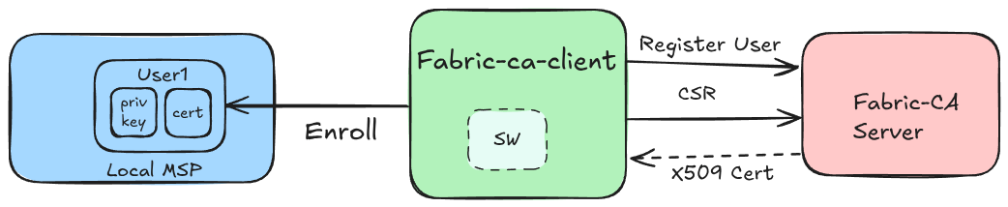
Filesystem access increases the risk of private key compromise, which can enable unauthorized actions depending on identity privileges. This setup is not secure, and it is not recommended to be used in production environments.
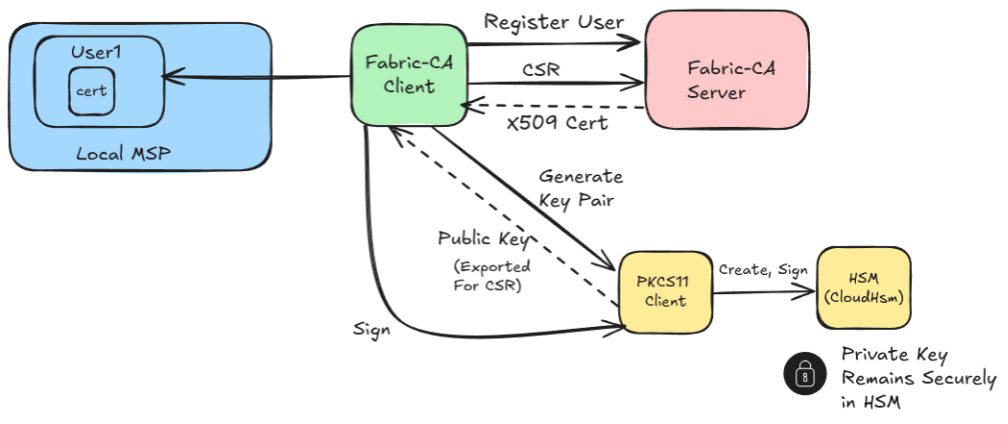
- PKCS11: In this mode, the private keys are stored in the HSM, and all the operations are done within the secure environment. This is secure as private keys never leave the HSM. As you can see in the following diagram, when fabric-ca-client calls the fabric-ca-server to register and enroll the user, only the user’s certificate will be stored in the local MSP. All the operations that require access to the private key of the identity are forwarded to the HSM, which executes the operation within the HSM secure enclave.
Architecture Overview
Fabric uses two types of keys:
- Enrollment keys (ECerts) – stored in HSM
- TLS keys – stored in filesystem
We deliberately run:
- CA in SW mode
- Enrollment fabric client in PKCS11 mode so that the private key is stored on cloudhsm.
- TLS fabric client in SW (software) mode so that the TLS key material is stored on filesystem.
This architecture avoids excessive HSM operations for every TLS handshake (which would be expensive and slow), while still protecting the keys that govern identity and transaction authority.
Install CloudHSM Client
– cloudhsm-client – the daemon that manages the connection from your machine to the HSM cluster.
– cloudhsm-pkcs11 – the PKCS11 shared library (`libcloudhsm_pkcs11.so`) that Fabric loads to talk to the HSM.
Follow the official AWS docs for the specific install commands:
After installation, the PKCS11 library will be at /opt/cloudhsm/lib/libcloudhsm_pkcs11.so. This path is referenced in every Fabric and Fabric CA BCCSP.PKCS11.Library configuration value.
Configure CloudHSM Client
sudo /opt/cloudhsm/bin/configure-client -a <HSM_IP_ADDRESS>
sudo systemctl start cloudhsm-client
sudo systemctl enable cloudhsm-client
# Verify that the client daemon is healthy:
sudo systemctl status cloudhsm-client
Create Crypto User
Log in to the cluster using the CloudHSM CLI as a Crypto Officer (CO) and create a Crypto User (CU). Fabric will authenticate as this crypto user.
cd /opt/cloudhsm/bin/

# Activate the CU (replace with your CO credentials)
./cloudhsm-cli user create --username <USERNAME> --role crypto-user

# Set the password
./cloudhsm-cli user change-password --username <USERNAME> --role crypto-user
Once the CU is created, the CLOUDHSM_PIN and CLOUDHSM_ROLE environment variables control how Fabric authenticates.
Useful AWS CloudHSM cli commands
cd /opt/cloudhsm/bin/
export CLOUDHSM_PIN=<username>:<password>
export CLOUDHSM_ROLE=crypto-user

# List all keys (shows labels, types, and key references)
./cloudhsm-cli key list --max-items=30

# Find a specific key by its label
./cloudhsm-cli key list --filter attr.label=org1peer0

# Find a key by its key-reference handle
./cloudhsm-cli key list --filter key-reference=$KEY_REFERENCE

# Delete a specific key by reference
./cloudhsm-cli key delete --filter key-reference=$KEY_REFERENCE
Key Concept: AltID
Each key stored in the HSM has a *label*, a human-readable string you assign. AltID is part of the PKCS11 BCCSP configuration and is used to map identities to HSM key labels.
We will configure AltIDs when we configure the fabric network.
Network setup guidelines
Prerequisites
- An AWS account with permissions to access CloudHSM clusters.
- A CloudHSM cluster already initialized with at least one active HSM. Refer to the AWS CloudHSM Getting Started Guide. Install cloudHSM client and PKCS11 client. Refer to the AWS CloudHSM section for this setup
- Install required tools: curl wget nano gcc gcc-c++ kernel-devel make jq git tree yq go
Build PKCS11 Fabric Binaries
Fabric includes PKCS11 support via BCCSP, but in practice prebuilt binaries may fail in HSM setups. Rebuild the binaries with GO_TAGS=pkcs11 if required. We will use Fabric CA version 1.5.8 because it has stable PKCS11 support that works well with the CloudHSM PKCS11 library.
Build Fabric CA with PKCS11
git clone https://github.com/hyperledger/fabric-ca.git
cd fabric-ca/
git checkout v1.5.8
make native GO_TAGS=pkcs11
The resulting binaries (fabric-ca-server, fabric-ca-client) are written to fabric-ca/bin/. Copy them to a directory in your $PATH or your project’s bin folder.
Build Fabric (Peer + Orderer) with PKCS11
git clone https://github.com/hyperledger/fabric.git
cd fabric/
git checkout release-2.5
make native GO_TAGS=pkcs11
The resulting binaries (peer, orderer, configtxgen, etc.) are stored in fabric/build/bin/ folder.
Configure the Fabric Network
As we are done with the pre-requisites for the Hyperledger fabric network, we can configure the fabric network now.
Hyperledger fabric provides abstractions over the cryptographic operations using a pluggable module called Blockchain Crypto Service Provider (BCCSP). There are 2 implementations of BCCSP – SW and PKCS11. These 2 types are already explained in the section Why use HSM with Hyperledger Fabric?. Fabric and Fabric CA have a BCCSP section in their configuration files. The config files need to be updated as follows to make the nodes & clients work in PKCS11 mode. See below.
peer:
  BCCSP:
    Default: PKCS11
    SW:
      Hash: SHA2
      Security: 256
      FileKeyStore:
        KeyStore:
    PKCS11:
      # Path to the CloudHSM PKCS11 library
      Library: /opt/cloudhsm/lib/libcloudhsm_pkcs11.so
      Label:
      # PIN — format is "username:password" for CloudHSM
      Pin:
      Hash: SHA2
      Security: 256
      Immutable: false
      # AltID is overridden at runtime via environment variable
      AltID:
Pin and label is intentionally left blank as they will be injected via environment variables at runtime. The AltId value becomes the HSM key label for the identity private key.
As per the architecture defined above, we will setup peer, orderer and fabric-ca-client in PKCS11 mode, CA server (orderer CA and org1 CA) will operate in SW mode. Start the CA servers.
When the fabric-ca-client enroll command is called, it generates a new keypair which gets signed by CA. With PKCS11 mode, the key generation happens inside the HSM, and the resulting public key is sent to the CA for signing. CA provides a certificate which gets stored locally. We need to set the FABRIC_CA_CLIENT_BCCSP_PKCS11_ALTID for each user before calling the enrollment command. This gives each identity its uniquely labelled key in the cloudhsm.
export CORE_PEER_BCCSP_PKCS11_ALTID=org1peer0
export ORDERER_GENERAL_BCCSP_PKCS11_ALTID=orderer1
export FABRIC_CA_CLIENT_BCCSP_PKCS11_ALTID=
Enrollment Flow with HSM
Before registering any new identities, we need to enroll in the admin user and provide the path to its msp folder. To enroll the admin user, we need to set the ALT_ID of the admin user using the FABRIC_CA_CLIENT_BCCSP_PKCS11_ALTID environment variable and then call the enroll command as this will use the ALTID (key label) to identify the key in cloudhsm.
Step 1: Set admin AltID
export FABRIC_CA_CLIENT_BCCSP_PKCS11_ALTID=org1ca-admin
Step 2: Enroll admin
fabric-ca-client enroll -d \
    -u https://$adminUsername:$adminPassword@localhost:5053 \
    --caname ca \
    --mspdir "${org1_dir}/ca/msp" \
    --tls.certfiles "${org1_tls}"
Once the admin gets enrolled, we will have the admin MSP folder in the path provided in the above command. The MSP folder will contain its signcert but not its private key, private key will be present in cloudhsm.
Step 3: Register user
After enrolling the admin user with CA, we can create new users and enroll them. While registering a new user, we need to set the ALTID of the admin user and call the register command.
# Set admin user ALTID
export FABRIC_CA_CLIENT_BCCSP_PKCS11_ALTID=org1ca-admin
# Register new user org1peer0
fabric-ca-client register -d \
    -u https://localhost:5053 \
    --id.name $ORG1_PEER_USERNAME \
    --id.secret $ORG1_PEER_PASSWORD \
    --id.type peer \
    --id.attrs "" \
    --caname ca \
    --tls.certfiles "${org1_tls}" \
    --mspdir "${org1_dir}/ca/msp"
Step 4: Enroll user
After executing the above command, peer or any other user will get registered with the CA. We need to enroll the new user so that we will get its local MSP artifacts.
# Switch to the user's own HSM key label
export FABRIC_CA_CLIENT_BCCSP_PKCS11_ALTID=org1peer0
# Enroll the new user
fabric-ca-client enroll -d \
  -u https://$ORG1_PEER_USERNAME:$ORG1_PEER_PASSWORD@localhost:5053 \
  --caname ca \
  --mspdir "${peer0org1_dir}/msp" \
  --tls.certfiles "${org1_tls}"
Similarly, we need to do it for all the required identities(peers, orderers, client users). All the registered identities keys will be stored in HSM.
Starting Nodes with HSM
Start Peer Node
# Set the peer ALTID before starting the peer node
export CORE_PEER_BCCSP_PKCS11_ALTID=org1peer0

# Start the peer node
peer node start
Start Orderer Node
# Set orderer ALTID before starting the orderer node
export ORDERER_GENERAL_BCCSP_PKCS11_ALTID=orderer1

# Start orderer node
orderer
You should see private and public key pairs for every identity labeled exactly as you defined in the AltID.
When the orderer starts, its BCCSP layer calls into lib cloudhsm_pkcs11.so which locates the orderer1 key in the HSM by label. All subsequent signing operations (block signing, consensus messages) use this HSM-resident key.
Even with HSM, MSP contains Certificates, CA certs, and Config. Identity validation still depends on the MSP.
After doing the above steps, we will have the fabric nodes up and running. Next thing we must do is the channel creation and chaincode deployment, which is like how we do it for SW type of network. Refer to the Hyperledger fabric docs for these steps.
Common Pitfalls
1. PKCS11 library not loading – Wrong path
2. Wrong PIN or role – Must use Crypto User (CU)
3. AltID mismatch – Causes key lookup failures
Conclusion
In this guide, we moved beyond basic setup and established a secure cryptographic foundation for Hyperledger Fabric using AWS CloudHSM. By integrating PKCS11 with Fabric’s BCCSP layer, we ensured that all critical identity keys are generated and retained in FIPS-validated CloudHSM, eliminating exposure on the filesystem. Successfully using CloudHSM with Fabric is not just about enabling PKCS11; it requires careful alignment between build configuration, runtime environment, and HSM behavior.
With this setup:
- Identity keys are protected by AWS CloudHSM
- Signing operations are securely offloaded to AWS CloudHSM
- The attack surface related to key compromise is significantly reduced